How can we help?
Popular: Create a workflow · Webhook guide · The verification fee
Write to us — a real person replies within a day, usually sooner.
Contact usPopular: Create a workflow · Webhook guide · The verification fee
Write to us — a real person replies within a day, usually sooner.
Contact usEvery step a workflow can include. Each is verified at the source and billed only on completion.
Eleven guides, in order — from your first look at the workspace to adding your team.
The same articles we surface to the people completing your workflow.
Integrate workflows into your product: links and embeds for applicants in, webhooks for data out, and the full API reference.
What Carousel is for developers and how the pieces fit together.
Two ways to put a workflow in front of applicants.
Receive structured results in your own system, in real time.
Per-step billing and when charges happen.
Common integration questions.
The full interactive endpoint reference.
New to Carousel? Two short reads cover the basics. Then follow the path for your role — reviewing applications, applying, or integrating.
Know the basics already? Head to the Product guides for your team or applicants, or the Developer guides to start integrating.
A secure platform that helps businesses collect and verify application information quickly and digitally.

Carousel is a modular platform that simplifies how businesses collect, verify, and process applicant data — turning complex workflows into intuitive digital flows.
You choose the steps that matter for your decision. Applicants complete them in one guided flow on their phone. Results arrive in the Portal, and optionally in your own systems, as structured data.
Workflows are built with a drag-and-drop builder in the Portal. Developers are optional — see Developer guides if you want to wire results into your own stack.
Every step a workflow can include — and the provider behind each one — in one view.
Mix any of these steps into a single flow. Each is verified at the source and billed only when an applicant completes it.
| Step | Provider | What it returns |
|---|---|---|
| Identity verification | Onfido / Ondato | Match a government ID to a live selfie. |
| Financial verification | Plaid / Flinks | Bank-linked income and cash flow. |
| Credit check | TransUnion / Equifax | A bureau pull with consent captured in flow. |
| Background check | Fastkey / Checkr | Criminal record screening. |
| Court & eviction checks | OpenRoom / SOQUIJ / TAL | Civil filings and tenancy records. |
| Document signature | PandaDoc | E-signature on any document. |
| Applicant request | Carousel | Ask for a file or an answer. |
| Applicant payment | Stripe | Collect a fee mid-flow. |
| Know Your Business | Carousel | Entity, ownership, and standing. |
| Alternative credit bureau | Carousel | Thin-file and newcomer coverage. |
| Fraud, AML & compliance | Sanction Scanner | Sanctions, PEP, and watchlist screening. |
| Custom questionnaire | Carousel | Your own questions, conditionally routed. |
| Self-declaration | Carousel | Attestations with an audit trail. |
Match a government ID to a live selfie, and read the fields off the document.
Most other steps can require identity verification first, so the result is tied to a verified person rather than a typed-in name.
This is a billable step, charged only when the applicant completes it. See Pricing and usage.
Bank-linked account ownership, balances, and enriched income insight.
Credentials are never seen or stored by Carousel or by your business. Where a bank is unsupported, a document-upload fallback can be enabled.
This is a billable step, charged only when the applicant completes it. See Pricing and usage.
A bureau pull with consent captured inside the flow.
This step normally requires identity verification first. Soft or hard pull depends on your bureau agreement.
This is a billable step, charged only when the applicant completes it. See Pricing and usage.
Criminal record screening tied to a verified identity.
Turnaround is usually seconds but can take minutes where a manual court search is required.
This is a billable step, charged only when the applicant completes it. See Pricing and usage.
Civil filings and tenancy records — the checks landlords and lenders actually ask for.
Coverage varies by province. Quebec results come from SOQUIJ and the TAL.
This is a billable step, charged only when the applicant completes it. See Pricing and usage.
Send a document for e-signature without leaving the flow.
Signed documents are included in the PDF export of the application.
This is a billable step, charged only when the applicant completes it. See Pricing and usage.
Ask for anything the other steps do not cover.
Useful for a void cheque, a letter of employment, or a photo of an asset.
This is a billable step, charged only when the applicant completes it. See Pricing and usage.
Collect a fee mid-flow — including the verification fee that starts an applicant-paid workflow.
In an applicant-paid workflow this step prepays every verification in the flow. Refunds are handled per Request a refund.
This is a billable step, charged only when the applicant completes it. See Pricing and usage.
Verify a business’s identity, ownership, and registration — KYB alongside KYC.
Pair with identity verification on the signing officer for a complete file.
This is a billable step, charged only when the applicant completes it. See Pricing and usage.
Coverage for thin-file applicants and newcomers.
Most useful for newcomers, students, and applicants without a Canadian bureau history.
This is a billable step, charged only when the applicant completes it. See Pricing and usage.
Sanctions, PEP, and watchlist screening on a verified identity.
The result and its timestamp are recorded for audit.
This is a billable step, charged only when the applicant completes it. See Pricing and usage.
Your own questions, conditionally routed, returned as structured fields.
Answers appear in the webhook payload under the Custom Questionnaire step.
This is a billable step, charged only when the applicant completes it. See Pricing and usage.
Attestations with an audit trail.
Use where a formal signature is unnecessary but a record is required.
This is a billable step, charged only when the applicant completes it. See Pricing and usage.
The big picture: one guided workflow instead of static forms — verified results land in your Portal as structured data.
Carousel replaces the patchwork of PDF forms, email attachments, and vendor portals with a single applicant-facing flow. Your team assembles the steps; Carousel handles the verification, the applicant experience, and the delivery of a finished file.
For your team is the Portal — building workflows and reviewing what comes back. For applicants is the flow itself, on their phone. This guide covers the first; see For applicants for the second.
The walkthrough video on the overview is the fastest way to get oriented.
The icon rail, search, filters — and the three areas you will use most.

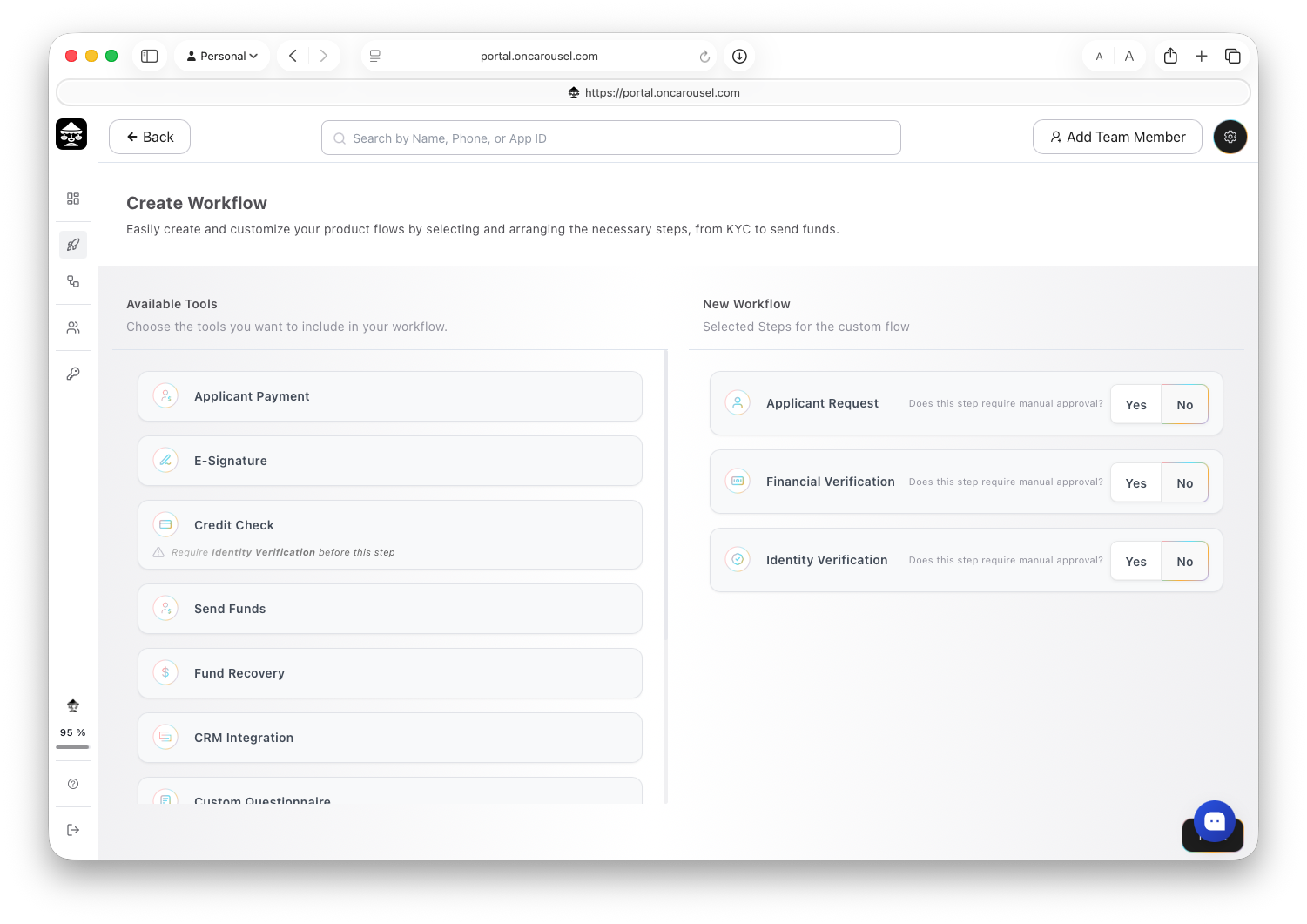
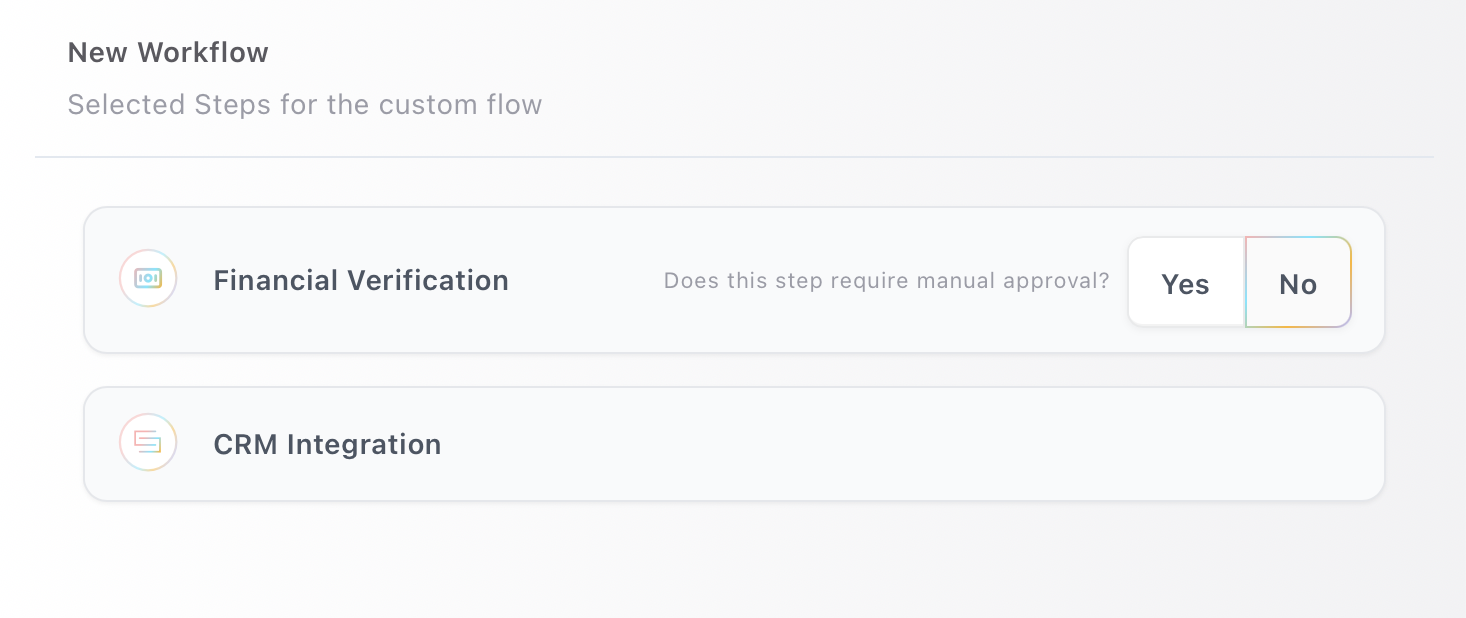
From Workflows, click Create New Workflow and assemble the steps your application needs — no code required.

Every step can be marked as requiring manual approval before the flow continues, or left to complete automatically. Some steps have prerequisites — a credit check, for example, requires identity verification first.
A workflow is either business-paid, where you cover the verification costs, or applicant-paid, where the applicant prepays and owns their verified profile. See Pricing and usage.
Every workflow gets a unique URL the moment you save it — see Share a workflow.
A workflow is assembled from the steps below. Mix and match whatever your application needs — each step links to more detail.
| Step | What it does |
|---|---|
| Applicant request | Collects key details about the applicant’s request, such as loan amount, purpose, and requested terms. |
| Applicant payment | Collects the verification fee from the applicant to initiate the workflow and cover the cost of running verification services. |
| Identity verification | Verifies the applicant’s identity using government-issued ID and biometric or document checks to prevent fraud. |
| Know Your Business (KYB) | Verifies a business’s identity, ownership, and registration details to confirm it is legitimate and authorized to transact. |
| Financial verification | Connects to the applicant’s bank account to retrieve income, cash flow, and transaction data for affordability assessment. |
| Credit check | Retrieves credit bureau data to assess creditworthiness. Requires identity verification first. |
| Background check | Screens criminal history and risk indicators against the verified identity. |
| Court & eviction checks | Surfaces court filings, disputes, and tenancy history from available databases. |
| Fraud, AML & compliance | Screens the applicant against sanctions and AML watchlists. |
| E-signature | Sends a document for signature and tracks it to completion. |
| Custom questionnaire | Gathers additional applicant information through dynamic, conditional forms. |
| Self-declaration | Captures applicant-provided disclosures — income, employment, and living situation. |
| Alternative credit bureau | Assesses creditworthiness for thin-file applicants and newcomers. |
Add a CRM Integration step at the end to post the finished file to your own system as JSON. See the Webhook guide.
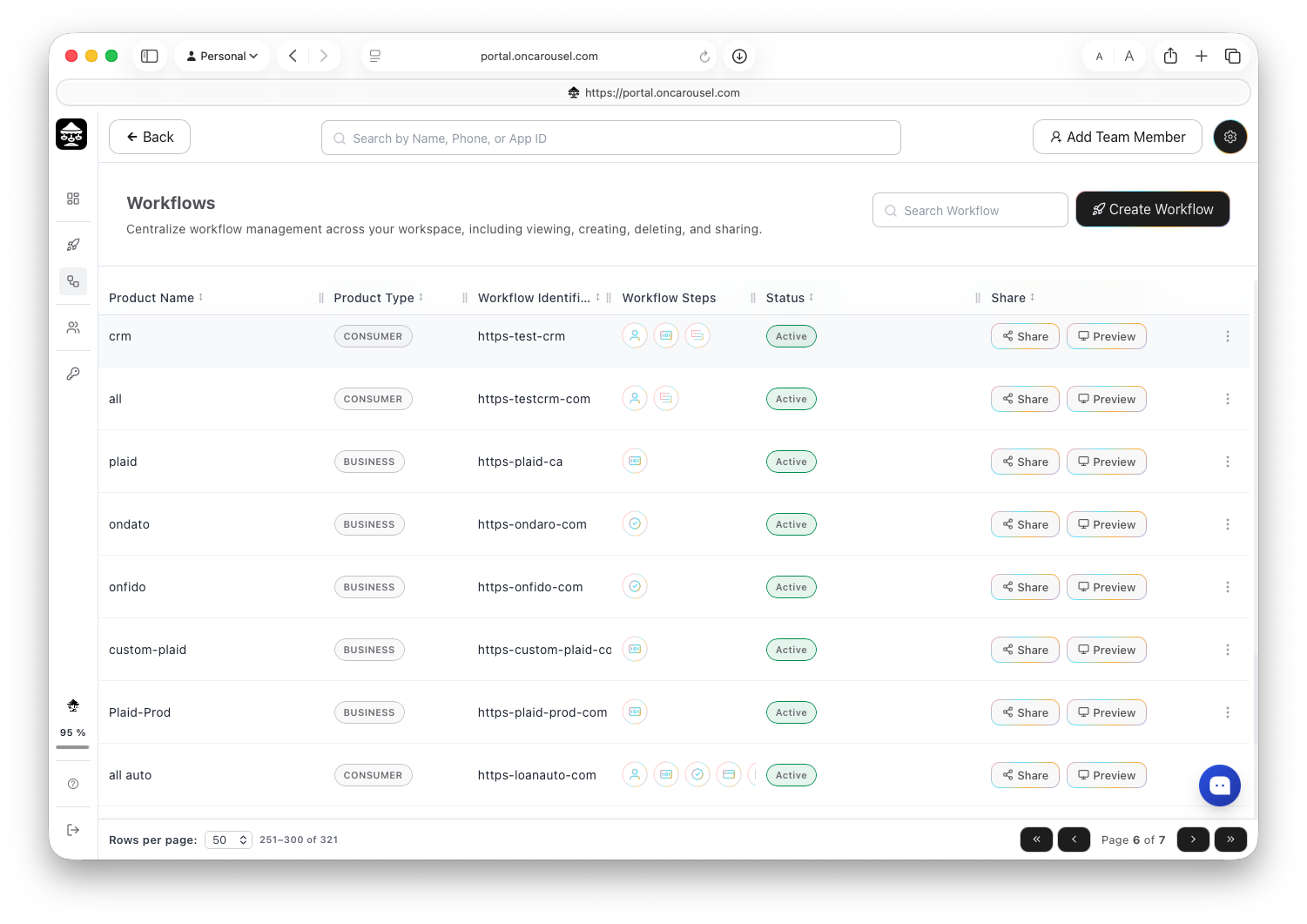
View, create, preview, share, and disable every workflow from one place.

The Workflows list shows each flow you have built, whether it is active, and how many applications it has produced.
Edits apply to new applications. Applications already in flight keep the version they started on.
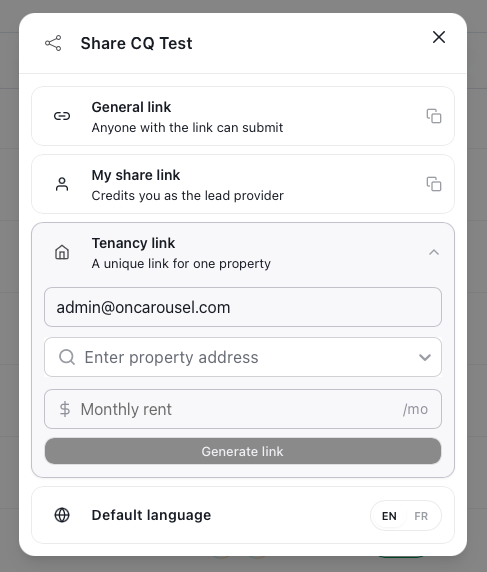
A general link, a personal share link, or an embed — plus the default language.

Direct links are recommended over embedding. See Direct link or embed for the tradeoffs and code.
Each workflow has a default language (EN or FR). Applicants can switch, but the link opens in the default you set.
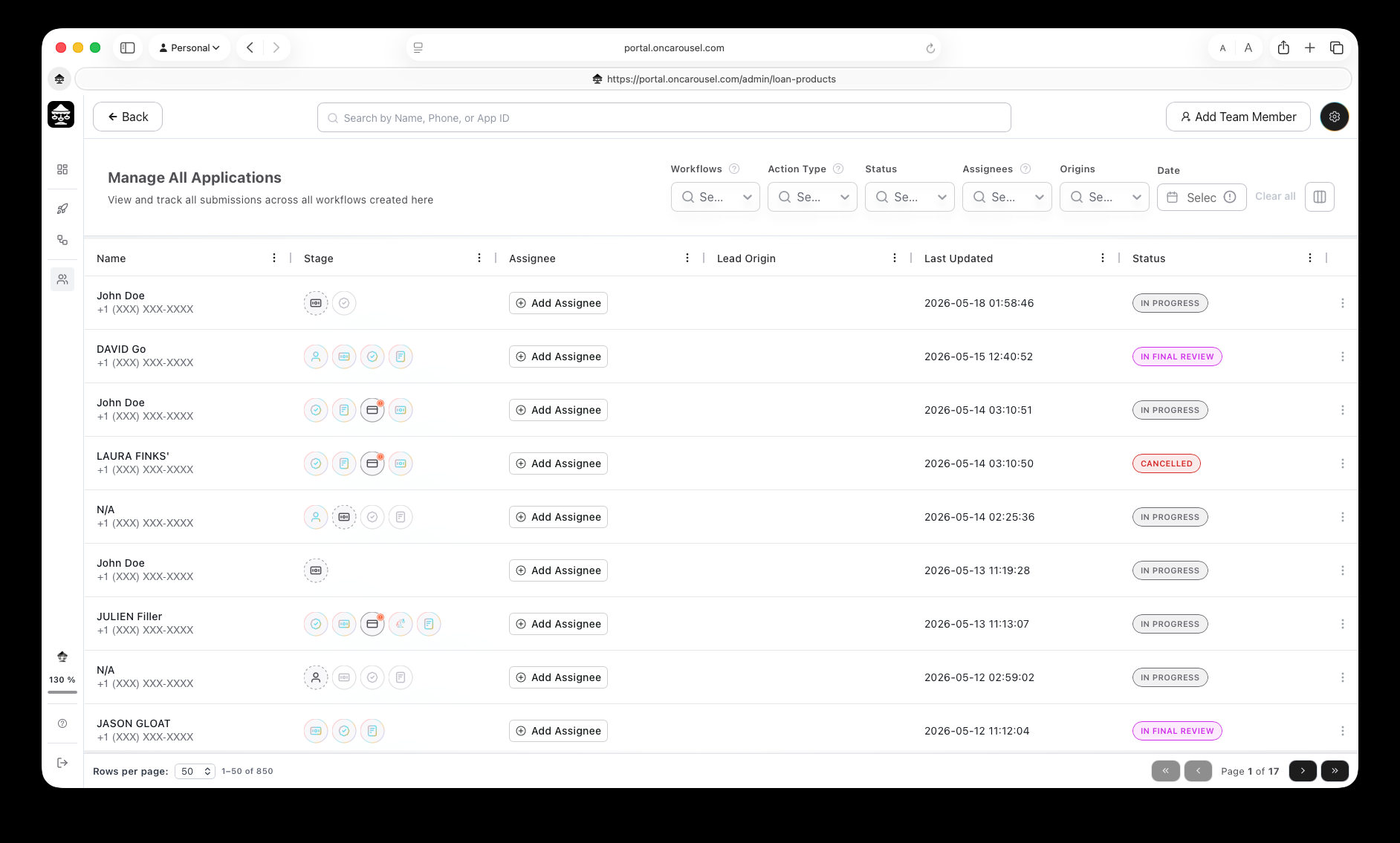
Manage All Applications: your team’s shared queue, with search, filters, and columns.

Applications lists every submission across every workflow, newest first.
Search by name, phone, or application ID; filter by workflow, stage, status, or assignee. See Stages & statuses for how to read each row.
How to read the status pill and the step-by-step stage icons on every row.
Each row shows one icon per step in the workflow, in order. A filled icon means the step completed; an outlined icon means it has not run yet.
A timed-out step can be re-run from the row’s Related actions without asking the applicant to start over.
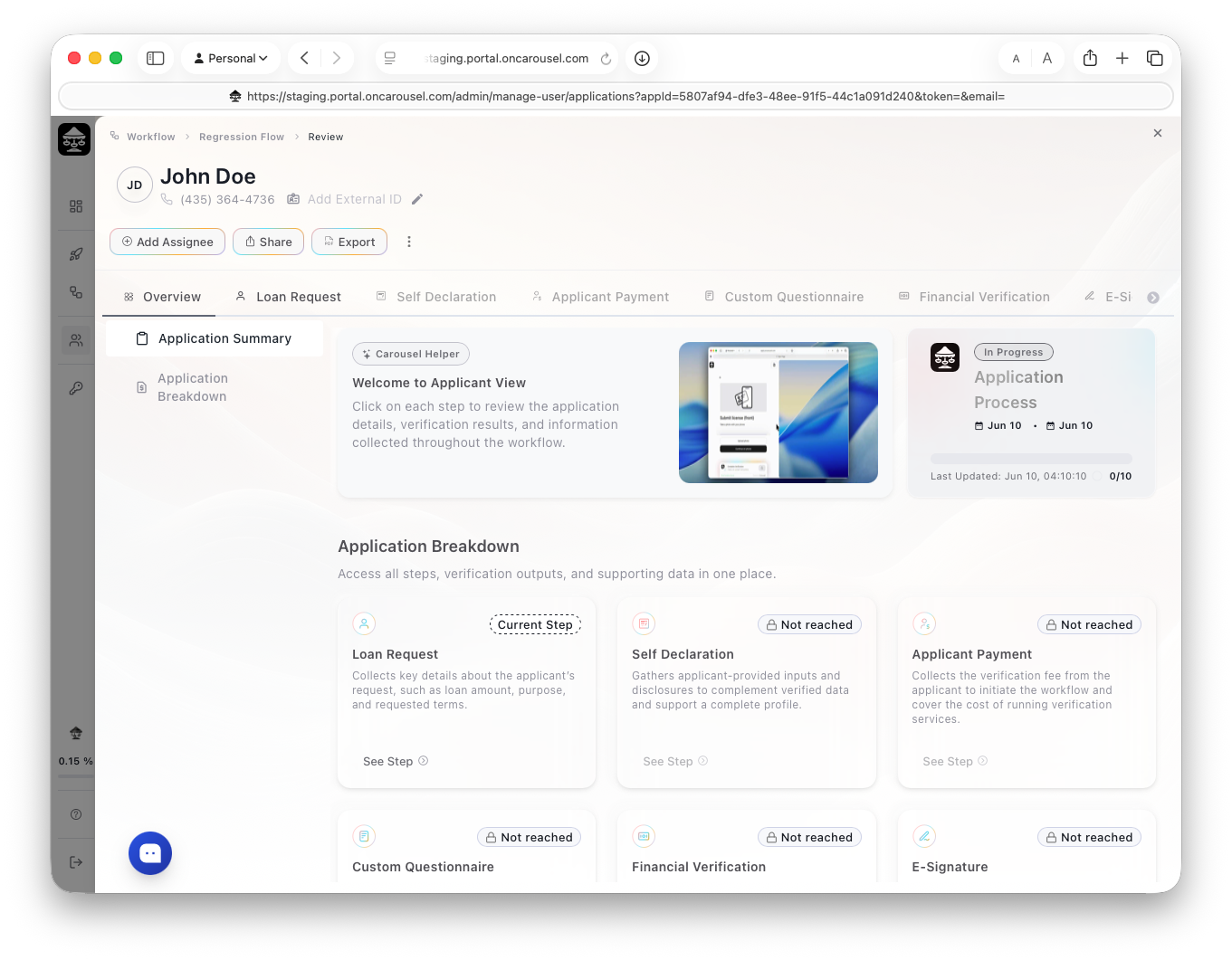
Read a finished file — every step result with its documents attached, on one page.

Open any submission to see each step’s result in the order the applicant completed it, with the underlying documents attached. There are no tabs to reconcile and nothing to download separately.
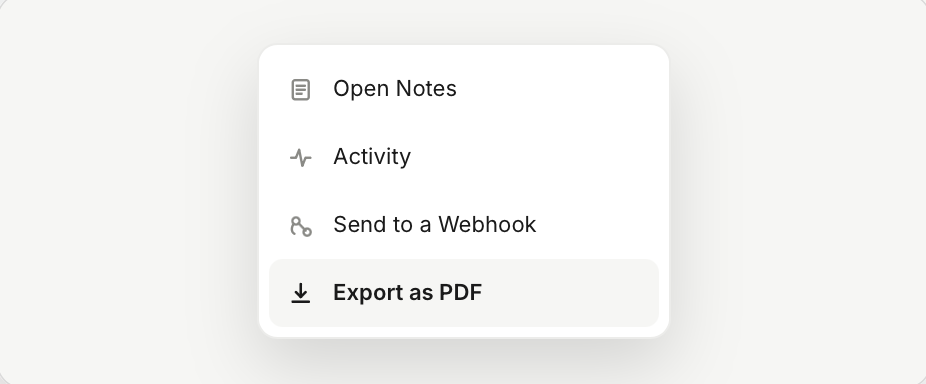
Approve, decline, or request more information. Where a step needed manual approval, the decision is recorded against that step. Export the file with Export as PDF.
Hand a complete, verified file to anyone who needs it.

Any completed submission exports as a single PDF containing every verified result and document, suitable for a credit file, an investor, or an audit.
A submission still in progress can be exported, but the PDF is marked incomplete and lists which steps are outstanding.
Seats, roles, and access — enforced per workspace.
Access is enforced per workspace with role-based access control and token-based authentication. See the Developer FAQ for the security detail.
Common questions from teams running Carousel.
Can I change a workflow after it is live? Yes. Edits apply to new applications; in-flight ones keep the version they started.
Can I preview a flow before sharing it? Yes — preview walks through it exactly as an applicant would see it.
Can two teams share a workspace? Yes, with roles scoped per member.
Can I restrict who sees submissions? Yes — reviewers only see the queue, not billing or integrations.
Can I white-label the flow? Yes — your logo and brand colours on the applicant experience.
What to expect, end to end.
A business sends you a link. You verify what is being asked for — your identity, your banking information, a signature — and submit. Each step happens in a secure window, and the business receives only the result they requested.
You can pause and return using the same link. See Complete an application.
Why the information is being requested — and what happens to it.
Verifying at the source means you do not have to gather statements, scan documents, or email anything. It also means the business can decide faster, because nothing has to be checked by hand afterwards.
Documents are encrypted in transit and at rest. You can request deletion at any time.
Finish in one sitting, on your phone.
What happens to your file next.
Your completed file goes to the business that requested it. If a step is still processing, it finishes on its own — you do not need to do anything else.
Your verified profile is yours to share.
In an applicant-paid workflow you prepay for the verifications, own the resulting profile, and choose who sees it.
The fastest way to collect verified data from applicants — think Stripe Checkout, but for onboarding. You build the workflow; Carousel turns it into a full-page experience applicants actually complete.
Drag-and-drop builder, no code needed. Customize, configure, and white-label every step.
Every workflow gets a unique URL the moment you create it.
A guided, mobile-optimized, full-page experience — on any device.
Results appear in the Carousel Portal for review — and can be sent instantly to your backend via webhook in JSON format.
Put Carousel in front of applicants — share the workflow URL or embed it via iframe.
Read the guide →Real-time application updates as structured JSON — events, payloads, S3 file handling, and retries.
Read the guide →The billable-step model, who pays, and example invoices.
Read the guide →Integrations, white-labeling, security, and compliance answers from the team.
Read the guide →The full interactive API reference — endpoints, schemas, and try-it-out requests.
Open ↗How to make a Carousel workflow accessible to applicants — through a direct link or by embedding it into your site.
https://apply.oncarousel.com/v2/application?domain=https%3A%2F%2Facmeinc.com&lead=This launches the workflow as a standalone, full-page interface — similar to Stripe Checkout. It’s optimized for speed, branding, and mobile responsiveness.
Why we recommend this approach:
You can embed the Carousel POS directly into your website using an <iframe>.
<iframe
src="https://apply.oncarousel.com/v2/application?domain=acme.ca"
width="100%"
height="800"
style="border:none;">
</iframe>
While iframe embedding is supported, it limits layout control and may degrade the applicant experience — especially on mobile.
Carousel workflows are designed to be used as a dedicated, full-page interface, and perform best when launched via direct link.
How to configure and use webhooks to receive real-time updates on application statuses — events, payloads, file handling, and retries.

Carousel lets you collect and verify applicant data using configurable, step-based workflows. You can customize, configure and white-label each workflow directly from the Portal — no code needed.
The CRM Integration step automatically sends collected applicant data to your system using a secure POST request.
WebhookOnce the applicant reaches this step, Carousel will send the workflow data as structured JSON.
Carousel will automatically send webhook events to your configured POST URL as the applicant progresses through the workflow. There are three main events:
Triggered when an applicant first creates an application (logs in with phone number).
Sample Payload
{
"loanApplicationId": "28b25f25-43b7-4871-ab47-239faaefbe10",
"phoneNumber": "+1 (605) 555-5555",
"apiUrl": "https://yourwebhook.com",
"createdAt": "2025-08-14T20:52:22.589Z",
"externalCustomerId":"your_customer_id",
"system": {
"step": "Loan Product",
"status": "Initializing",
"updatedAt": "2025-08-14T20:52:21.233Z"
},
"application": {
"status": "In Progress",
"updatedAt": "2025-08-14T20:52:21.233Z"
},
"updatedAt": "2025-08-14T20:52:22.589Z"
}
Triggered when the applicant finishes all required steps.
{
"loanApplicationId": "20ca981e-b94d-426a-a74a-9e17f315c7fc",
"phoneNumber": "+1 (605) 555-5555",
"apiUrl": "https://yourwebhook.com",
"createdAt": "2025-08-14T20:52:22.589Z",
"externalCustomerId":"your_customer_id",
"system": {
"step": "Loan Product",
"status": "Initializing",
"updatedAt": "2025-08-14T20:52:21.233Z"
},
"application": {
"status": "Completed",
"updatedAt": "2025-08-14T20:52:21.233Z"
},
"dataStep": [
{
"step": "Loan Product",
"data": {
"id": "4361048b-5a52-46e6-ade6-a923ce39bb71",
"calculatorConfig": {
"upfrontFee": 0,
"originationFee": 0,
"brokerageFeePercent": 0
},
"calculatorType": 0,
"annualInterest": 5,
"minimumLoanAmount": 500,
"name": "cll",
"amount": 500,
"assignments": [],
"applicationDate": "2025-02-17T16:08:00.304Z",
"approvalDate": "2025-02-17T16:10:09.001Z",
"businessId": "e35cba52-a7f3-53c1-a47c-e539aa26d681",
"externalCustomerId": null,
"detailsOnUseOfFunds": null,
"purposes": ["Inventory"],
"urgencyOfFunds": null
}
},
{
"step": "Identity",
"data": {
"gender": "Male",
"dateOfIssue": "2024-10-10T00:00:00.000Z",
"fullName": "JOHN DOE",
"country": "CAN",
"dateOfBirth": "1998-03-08T00:00:00.000Z",
"dateOfExpiration": "2027-06-30T00:00:00.000Z",
"documentNumber": "H0653-00009-80308",
"province": "ON",
"frontImageUrl": "https://staging.api.oncarousel.com/uploads/kyc/330b8683-1428-4f94-a558-3c9c2db0dec4.jpeg?Expires=1767726190&Key-Pair-Id=K1G5A68240S8O&Signature=HWka0sGDCY96n0DsQaw37PEqghDXR4TkR0sESFEPL5Uw9iF3UTunI2KVLsVOgjg0PkSpr3dYLoBx9O4rBiJUE9XIqhpJk1b4CcPuETT1SMMyF89M82F1TPlx7gyBlBtF3N5eilvK1EnWJc8CPL4Q~-Z64CLOU6HMmFEg1KpZ2yauGH3OWwMXVXWFjOk2JLzZv1JRYFGqYVTWtxOswgZhFf8tiZPLHfHElHAI1E6huPQ9s5JCFO3LeOU2MjWkjz3Mr2yL7RtLKjjOrlW5HAEvXJ-BgOR7HBSL9XntY7VWxCBSxJZ3A~mex3t4tif7aZY079dWpOVmxYwTPZ9OgBmVDw__"
}
},
{
"step": "Bank Account",
"data": {
"loginId": "6433cf6a-0879-4ef0-5a2a-08d91642f9c6",
"bankAccount": [] // This step is still processing so no bank accounts were saved
}
},
{
"step": "Custom Questionnaire",
"data": {
"questions": [
{
"id": "5bbb1eb4-57c3-4c0c-aa08-b1a4a29eab85",
"name": "What is the full legal name of your company ?",
"answer": "Spheregbs"
},
{
"id": "5f3edc6e-6247-47f1-8a15-be6c271b8788",
"name": "Would you like for the lease to be under your company or personal ?",
"answer": "Company"
},
{
"id": "2de688e5-3ae1-46bb-b587-669f2168652d",
"name": "Address from where vehicle will operate?",
"answer": ""
}
]
}
}
],
"updatedAt": "2025-07-22T15:55:23.986Z"
}
A complete example with every step type present, including financial accounts, questionnaire answers, e-signature, credit, background, court and self-declaration data.
{
"loanApplicationId": "dc8ef61b-35a2-4634-88d8-38e637abb2c4",
"phoneNumber": "+1 (500) 555-0006",
"apiUrl": "https://webhook.site/e9cb118c-fcf8-4314-99d0-2ca03d18a8bb",
"createdAt": "2026-04-10T16:30:32.649Z",
"externalCustomerId": "",
"system": {
"status": [
{
"step": "Loan Request",
"statuses": [
"Approved"
]
},
{
"step": "Applicant Payment",
"statuses": [
"Approved"
]
},
{
"step": "Financial Verification",
"statuses": [
"Approved"
]
},
{
"step": "E-Signature",
"statuses": [
"Approved"
]
},
{
"step": "CRM Integration",
"statuses": [
"Completed"
]
},
{
"step": "Credit Check",
"statuses": [
"Approved"
]
},
{
"step": "Identity Verification",
"statuses": [
"Approved"
]
},
{
"step": "Custom Questionnaire",
"statuses": [
"Approved"
]
},
{
"step": "Self Declaration",
"statuses": [
"Approved"
]
},
{
"step": "Background Check",
"statuses": [
"Approved"
]
},
{
"step": "Court & Eviction Checks",
"statuses": [
"Approved"
]
}
],
"updatedAt": "2026-04-10T16:30:32.013Z"
},
"application": {
"status": "In Progress",
"updatedAt": "2026-04-10T16:30:32.013Z"
},
"dataStep": [
{
"step": "Loan Request",
"data": {
"id": "35827328-61cc-47c4-b5c9-809c6630784a",
"annualInterest": 100,
"calculatorConfig": {
"upfrontFee": 0,
"originationFee": 0,
"brokerageFeePercent": 0
},
"calculatorType": "Installment",
"minimumLoanAmount": 100,
"applicationDate": "2026-04-10T15:44:27.955Z",
"approvalDate": "",
"businessId": "9956134d-c746-57e6-8a7e-0be300dfe5c7",
"detailsOnUseOfFunds": "",
"externalCustomerId": "",
"purposes": [],
"urgencyOfFunds": "",
"name": "Full",
"amount": "200.00",
"assignments": [
{
"fullName": "",
"email": "",
"phoneNumber": "",
"id": ""
}
]
}
},
{
"step": "Identity Verification",
"data": {
"gender": "Male",
"dateOfIssue": "2012-11-30T00:00:00.000Z",
"fullName": "TEST CARD SAMPLE",
"country": "CAN",
"dateOfBirth": "1982-01-04T00:00:00.000Z",
"dateOfExpiration": "2017-11-30T00:00:00.000Z",
"documentNumber": "2222222",
"documentType": 3,
"province": "BC",
"frontImageUrl": "https://staging.api.oncarousel.com/uploads/kyc/8ac994fb-667f-49a3-8987-53456a6205aa.jpg?Expires=1775839532&Key-Pair-Id=K1G5A68240S8O&Signature=NyX8OQ~xHjGnSWvB5wpj6kb5a52c1WQ7gQ2tvpvpWjF5SpkbJDZ0AISkU1BYVRb2gd4zzbF3svgVs26JuEzdLCr0vl3MMKplxShdDthyakikV27kfSoFDYEJrlXzQjl7GIZv1vZOrbcyik80fveyjVTKespEFuBr4b3hrDAlKCJwdHTFEwf7B1~4drilt8VUGTXAGsKonsZSOlZOPHxJ0isjMZkjuAVxBwB0SSH3OJ58YEmcBX8Pj4b~ycKlYcdt8HKlizeW2C0P1gbt-NWMCsiejHrYN9m8JvAr-v2MgZOAXexo0EmnCOy5KblIWwfocqMFHVd~ilvM~uMLQQWLbA__",
"address": "910 GOVERNMENT ST, VICTORIA BC V8W 3Y8"
}
},
{
"step": "Financial Verification",
"data": {
"loginId": "f4847c89-9d93-4e1f-1544-08ddf53a0c5c",
"bankAccount": [
{
"accountTitle": "Chequing CAD",
"accountNumber": "1111000",
"institutionNumber": "777",
"institutionName": "FlinksCapital",
"transitNumber": "77777",
"category": "Operations",
"type": "Chequing",
"currency": "CAD",
"balanceAvailable": 50300,
"balanceCurrent": 50000,
"balanceLimit": 0,
"overdraftLimit": 0,
"holder": {
"fullname": "John Doe",
"email": "johndoe@flinks.io",
"phoneNumber": "(514) 333-7777",
"address": {
"address": "1275 avenue des Canadiens-de-Montréal",
"city": "Montréal",
"province": "QC",
"zipCode": "H3B 5E8",
"country": "CA"
}
}
},
{
"accountTitle": "First Home Savings Account",
"accountNumber": "FHSA1234567",
"institutionNumber": "",
"institutionName": "FlinksCapital",
"transitNumber": "",
"category": "Products",
"type": "FHSA",
"currency": "CAD",
"balanceAvailable": 0,
"balanceCurrent": 200000,
"balanceLimit": 0,
"overdraftLimit": 0,
"holder": {
"fullname": "John Doe",
"email": "johndoe@flinks.io",
"phoneNumber": "(514) 333-7777",
"address": {
"address": "1275 avenue des Canadiens-de-Montréal",
"city": "Montréal",
"province": "QC",
"zipCode": "H3B 5E8",
"country": "CA"
}
}
},
{
"accountTitle": "Plaid Saving",
"accountNumber": "1111",
"institutionNumber": "",
"institutionName": "RBC Royal Bank",
"transitNumber": "",
"category": "other",
"type": "depository",
"currency": "CAD",
"balanceAvailable": 200,
"balanceCurrent": 210,
"balanceLimit": 0,
"overdraftLimit": 0,
"holder": {
"fullname": "Alberta Bobbeth Charleson",
"email": "accountholder0@example.com",
"phoneNumber": "1112223333",
"address": {
"address": "478 Plaid Street",
"city": "Gingham",
"province": "AB",
"zipCode": "T0B 0Z0",
"country": "CA"
}
}
},
{
"accountTitle": "Credit card",
"accountNumber": "420024******4242",
"institutionNumber": "",
"institutionName": "FlinksCapital",
"transitNumber": "",
"category": "Credits",
"type": "CreditCard",
"currency": "CAD",
"balanceAvailable": 20000,
"balanceCurrent": 10000,
"balanceLimit": 30000,
"overdraftLimit": 0,
"holder": {
"fullname": "John Doe",
"email": "johndoe@flinks.io",
"phoneNumber": "(514) 333-7777",
"address": {
"address": "1275 avenue des Canadiens-de-Montréal",
"city": "Montréal",
"province": "QC",
"zipCode": "H3B 5E8",
"country": "CA"
}
}
},
{
"accountTitle": "Line of Credit",
"accountNumber": "LC010101",
"institutionNumber": "",
"institutionName": "FlinksCapital",
"transitNumber": "",
"category": "Credits",
"type": "LineOfCredit",
"currency": "CAD",
"balanceAvailable": 6000,
"balanceCurrent": 3000,
"balanceLimit": 9000,
"overdraftLimit": 0,
"holder": {
"fullname": "John Doe",
"email": "johndoe@flinks.io",
"phoneNumber": "(514) 333-7777",
"address": {
"address": "1275 avenue des Canadiens-de-Montréal",
"city": "Montréal",
"province": "QC",
"zipCode": "H3B 5E8",
"country": "CA"
}
}
},
{
"accountTitle": "Investments",
"accountNumber": "INV00001",
"institutionNumber": "",
"institutionName": "FlinksCapital",
"transitNumber": "",
"category": "Products",
"type": "RRSP",
"currency": "CAD",
"balanceAvailable": 0,
"balanceCurrent": 100000,
"balanceLimit": 0,
"overdraftLimit": 0,
"holder": {
"fullname": "John Doe",
"email": "johndoe@flinks.io",
"phoneNumber": "(514) 333-7777",
"address": {
"address": "1275 avenue des Canadiens-de-Montréal",
"city": "Montréal",
"province": "QC",
"zipCode": "H3B 5E8",
"country": "CA"
}
}
},
{
"accountTitle": "Plaid Cash Management",
"accountNumber": "9002",
"institutionNumber": "",
"institutionName": "RBC Royal Bank",
"transitNumber": "",
"category": "other",
"type": "depository",
"currency": "CAD",
"balanceAvailable": 12060,
"balanceCurrent": 12060,
"balanceLimit": 0,
"overdraftLimit": 0,
"holder": {
"fullname": "Alberta Bobbeth Charleson",
"email": "accountholder0@example.com",
"phoneNumber": "1112223333",
"address": {
"address": "478 Plaid Street",
"city": "Gingham",
"province": "AB",
"zipCode": "T0B 0Z0",
"country": "CA"
}
}
},
{
"accountTitle": "Chequing US",
"accountNumber": "1111001",
"institutionNumber": "777",
"institutionName": "FlinksCapital",
"transitNumber": "77777",
"category": "Operations",
"type": "Chequing",
"currency": "USD",
"balanceAvailable": 25300,
"balanceCurrent": 25000,
"balanceLimit": 0,
"overdraftLimit": 0,
"holder": {
"fullname": "John Doe",
"email": "johndoe@flinks.io",
"phoneNumber": "(514) 333-7777",
"address": {
"address": "1275 avenue des Canadiens-de-Montréal",
"city": "Montréal",
"province": "QC",
"zipCode": "H3B 5E8",
"country": "CA"
}
}
},
{
"accountTitle": "Plaid Checking",
"accountNumber": "0000",
"institutionNumber": "",
"institutionName": "RBC Royal Bank",
"transitNumber": "",
"category": "checking",
"type": "depository",
"currency": "CAD",
"balanceAvailable": 100,
"balanceCurrent": 110,
"balanceLimit": 0,
"overdraftLimit": 0,
"holder": {
"fullname": "Alberta Bobbeth Charleson",
"email": "accountholder0@example.com",
"phoneNumber": "1112223333",
"address": {
"address": "478 Plaid Street",
"city": "Gingham",
"province": "AB",
"zipCode": "T0B 0Z0",
"country": "CA"
}
}
},
{
"accountTitle": "Another Business Account",
"accountNumber": "BA777",
"institutionNumber": "777",
"institutionName": "FlinksCapital",
"transitNumber": "77777",
"category": "Credits",
"type": "Chequing",
"currency": "CAD",
"balanceAvailable": 84,
"balanceCurrent": 42,
"balanceLimit": 0,
"overdraftLimit": 0,
"holder": {
"fullname": "Mo'e Money Inc.",
"email": "biz@flinks.com",
"phoneNumber": "514-123-4567",
"address": {
"address": "1000 de la Gaucheti\ufffdre",
"city": "Montreal",
"province": "QC",
"zipCode": "A1A 1A1",
"country": "CA"
}
}
},
{
"accountTitle": "Personal loan",
"accountNumber": "LO020202",
"institutionNumber": "",
"institutionName": "FlinksCapital",
"transitNumber": "",
"category": "Credits",
"type": "LoanPersonal",
"currency": "CAD",
"balanceAvailable": 0,
"balanceCurrent": 200000,
"balanceLimit": 0,
"overdraftLimit": 0,
"holder": {
"fullname": "John Doe",
"email": "johndoe@flinks.io",
"phoneNumber": "(514) 333-7777",
"address": {
"address": "1275 avenue des Canadiens-de-Montréal",
"city": "Montréal",
"province": "QC",
"zipCode": "H3B 5E8",
"country": "CA"
}
}
},
{
"accountTitle": "Business Account",
"accountNumber": "BA-12345",
"institutionNumber": "777",
"institutionName": "FlinksCapital",
"transitNumber": "77777",
"category": "Operations",
"type": "Unknown",
"currency": "CAD",
"balanceAvailable": 0,
"balanceCurrent": 1000000,
"balanceLimit": 0,
"overdraftLimit": 0,
"holder": {
"fullname": "Very Successful Inc.",
"email": "success@flinks.com",
"phoneNumber": "514-777-7777",
"address": {
"address": "123 Moon Dr.",
"city": "Golden City",
"province": "QC",
"zipCode": "H0H 0H0",
"country": "CA"
}
}
}
]
}
},
{
"step": "Custom Questionnaire",
"data": {
"questions": [
{
"id": "f913043a-c667-41c2-8dcc-b7ffe8bbb301",
"name": "What is your phone number - Email?",
"answer": "123"
}
]
}
},
{
"step": "E-Signature",
"data": {
"documentId": "44MMZgzKoH7nMeRMLjR7mL",
"document": "https://staging.api.oncarousel.com/uploads/legal-contract/82c2e17f-5c30-43be-a595-d41b89433a6a?Expires=1775839533&Key-Pair-Id=K1G5A68240S8O&Signature=FfTnsORbGhleGS96Zxy6cnnCttRjtm0cbJBTIOdHPn2yfezNCwN8TBrJkmBdaTDahDXXdwpBtzWGyPkAhjrQtjvHMDhQghmO92C6-kk710fTD~hKEHO9rqw7-1suzW~63J0tIQ6TFSFtO-~k-vY6qMQckeT3S0AYDeglCOzxCoxq-UAckhcLWAbt3gjcPNSw3tIXSUnom5EBlRNoyCTJF18~vkSUBqsP-IMgI2gfziRgqUsjSJ1y0B1tLpHzIVETjzD9pXjz-zjo2fWTSvZboz~HyHTPwsV4my2d7It-ZCqFSdkAWs07yr-FR3SUaAxCVA2JDkfcOP0NOJ73vaSbQA__"
}
},
{
"step": "Credit Check",
"data": "https://staging.api.oncarousel.com/uploads/credit-check/dc8ef61b-35a2-4634-88d8-38e637abb2c4/975ZZ70232?Expires=1775839533&Key-Pair-Id=K1G5A68240S8O&Signature=Y-tEflENSye7HdCJ2q3FWRyweAF7gqgRTK~73ZEe9MPv3FBvA26lfnIR7W6o8tuzX4MsNRtitZGwfMxs9tjtIS8S85RzPyAF~HaxB0SA0rkxRXzDGwfUTdpFgC8yEDnK4l1oVlXHCazq2AsBPsdpaxgzLWVF7P3jCjwnGgc6KCEs1bThS084IjeJ8Wd0aA6HEpOSulORNzNWmtsPjG89q0QtyvKXkTwjSAFHyJaT6sHVQ0ZQ9I-JQP0Ceddkt2DujWVwHC93bNVBDb6SQKh6EBejLEe8Xiz3eZUjtsalnucseR9pewjGBa8tBkwOW1vcRepgCoNfSwsX6jTSCvK93g__"
},
{
"step": "Background Check",
"data": {
"criminalChecks": {
"reportId": "69d924ca4658d28470210cd5",
"status": "Incomplete",
"serviceType": "STANDARD_CRIMINAL_RECORD_CHECK",
"standardResult": "Incomplete",
"submittedAt": null,
"completedAt": "2026-04-10T16:30:30.764Z",
"info": {
"birthCity": "111",
"birthCountry": "111",
"birthProvince": "111",
"dateOfBirth": "1982-01-04T00:00:00.000Z",
"email": "admin@oncarousel.com",
"firstName": "TEST CARD",
"lastName": "SAMPLE",
"phone": "+15005550006",
"gender": "Male"
},
"addressHistory": [
{
"address": "910 GOVERNMENT ST",
"city": null,
"country": "CAN",
"province": "BC",
"zipCode": null
}
],
"verification": {
"passed": true,
"verifiedAt": "2026-04-10T16:26:51.532Z"
},
"convictions": [],
"pdfs": [
{
"note": "This is a test document - not a real criminal check result",
"label": "Standard Criminal Record Check (TEST)",
"docRefId": "test_doc_1775838416763",
"pdfUrl": "https://staging.api.oncarousel.com/uploads/criminal-check/69d924ca4658d28470210cd5/test_doc_1775838416763.pdf?Expires=1775839533&Key-Pair-Id=K1G5A68240S8O&Signature=1LhYfqT6ZHzSUgjJ5JPxO13X7U5pTKVhbPtaJQ-7WTbVGmXDpKUMwiLtKlCzw~nvueN25nNYI4CqXxs1XG4WP~jm0~z7QIlOmufMZhllYBo48TkdTLsm-gItGKJ2O9~9rdLebuOjBek8TAsa-9dKV~TNdCCDVWzo84XQF7yA9xo3iUOuGMfZrvEWo6ngGij9mRdP8kxMZz3C1PgZFRf9p5wTNgXiqc1~myhLLYP3AYPpC3wgxB3tu9UMbQIFMJ2t4Ms48dOD3Oy2lga03TJa2XM~aZuH9-jHqCK1KxzxK1arT9YclnMglRKvRQ~BiWiBPl-F9hG3m7PC7mnPBsjlyQ__",
"isSecure": true
}
]
}
}
},
{
"step": "Court & Eviction Checks",
"data": {
"legalChecks": [
{
"status": "Completed",
"reporter": "Openroom Sandbox",
"isMatch": true,
"message": "Cleared, no matching court records found in available databases",
"items": [
{
"url": "https://openroom.ca/dashboard/document/19b33f3e-dceb-4a81-9fcc-6e81f29ec771",
"title": "OR-SANDBOX-4: Filed by landlord on 2022-05-05",
"name": "Dama Ging",
"address": "BASEMENT, 13 DEBTOR DRIVE, OSHAWA, B2B2B2"
}
]
}
]
}
},
{
"step": "Self Declaration",
"data": {
"monthlyIncomeAmount": 13300,
"employmentStatusDetail": {
"status": "Employed Full Time",
"position": "123",
"startDate": "2026-04-10",
"companyName": "123",
"employerEmail": "123@gmail.com",
"employerFullName": "123",
"employerPhoneNumber": "+15555555555"
},
"lifestyleInformation": [
"I vape or smoke",
"I own pets",
"I have a criminal background"
],
"livingStatusDetail": {
"status": "Other",
"detail": "2323232"
}
}
}
],
"updatedAt": "2026-04-10T16:30:32.649Z"
}
Carousel no longer sends documents or images as base64 in webhook payloads. Instead, file fields (for example frontImageUrl) contain a temporary, pre-signed Amazon S3 URL.
When your system receives a webhook containing file URLs:
If the URL expires before you download the file, the document cannot be accessed using that link.
If your webhook endpoint is unavailable, times out, or fails to process the payload (for example due to expired file links), you can manually re-trigger the webhook.
This will send the latest available payload again, including fresh S3 URLs for any files.

Need help with:
We’re here to help: Speak to Support
Billing is simple: you’re only charged when an applicant completes a billable step.
Carousel charges per billable step — there are no platform fees beyond the steps applicants actually complete.
A billable step is any verification an applicant completes in a workflow — identity, KYB, financial, credit, background, court & eviction, fraud & compliance screening, e-signature, or payment. Only completed steps are charged.
Every workflow can be configured with one of two payment structures:
A charge occurs when an applicant completes a billable step in your workflow — nothing is charged before that.
| Billable Step | Provider | Fee |
|---|---|---|
| Identity Verification | Onfido / Ondato | $- / step |
| Know Your Business (KYB) | Carousel | $- / step |
| Financial Verification | Plaid / Flinks | $- / step |
| Credit Check | TransUnion / Equifax / Experian (coming soon) | $- / step |
| Background Check | Fastkey / Checkr | $- / step |
| Court & Eviction Checks | OpenRoom / SOQUIJ / TAL / Checkr | $- / step |
| Fraud, AML & Compliance | Sanction Scanner | $- / step |
| Applicant Payment | Stripe | $- / step |
| E-Signature | PandaDoc | $- / step |
| Custom Questionnaire | Carousel built-in | $- / step |
| API / Webhooks | Carousel API | $- / call |
| Category | Service / Step Type | Description |
|---|---|---|
| Financial Verification | Bank Connect | Connect and verify applicant bank accounts securely. |
| Enrichment | Generate income and transaction insights from financial data. | |
| Document Upload | Retrieve verified data from uploaded financial data. | |
| Rule Engine | Apply decision rules on financial data. | |
| Identity Verification | Biometric Scan + ID | Match ID to selfie for identity verification. |
| E-Signature | Sign Document | Send and track e-signature requests (via PandaDoc). |
| Credit Check | Credit Report Pull | Retrieve credit bureau data (TransUnion, Equifax; Experian coming soon). |
| Applicant Payment | Verification Fee | Collect the verification fee that initiates the workflow (via Stripe). |
| Know Your Business | KYB Check | Verify a business’s identity, ownership, and registration details. |
| Background Check | Criminal Record Search | Identify criminal history or risk indicators (Fastkey, Checkr). |
| Court & Eviction Checks | Court Record Search | Surface filings, disputes, or legal activity (OpenRoom, SOQUIJ, TAL, Checkr). |
| Fraud, AML & Compliance | Watchlist Screening | Screen against sanctions and AML watchlists (Sanction Scanner). |
| Custom Questionnaire | Data Collection | Gather applicant information through dynamic forms. |
| API / Webhooks | Post URL / Data Transfer | Exchange data between Carousel and your system. |
Let’s say your workflow includes:
If an applicant completes every step, here’s what you’re charged:
| Step | Provider | Fee |
|---|---|---|
| Identity Verification | Onfido | $- / step |
| Financial Verification | Flinks | $- / step |
| Credit Check | Equifax | $- / step |
| E-Signature | PandaDoc | $- / step |
| Applicant Payment | Stripe | $- / step |
| Total for the workflow | — | ≈ $ - |
Either, depending on how the workflow is configured. If your business pays, applicants complete the workflow at no charge and the results are delivered to you. If the applicant pays, they prepay for all the verifications upfront, own their verified profile, choose whether to share it with you — or with others — and can request a refund if there are issues with their workflow.
When an applicant completes a billable step. Every step that ran is itemized on your invoice, including any that failed. Steps the applicant never reached are not charged.
You’re charged for the steps that ran, including any that failed. Steps the applicant never reached are not charged.
Yes. Each invoice includes a breakdown of usage by Billable Step.
Help with your questions directly from the Carousel team — setup, integrations, pricing, security, and compliance.
Carousel is a modular platform that simplifies how businesses collect, verify, and process applicant data — turning complex workflows into intuitive digital flows.
Nope! Carousel is built for speed and simplicity. You can create flows using our drag-and-drop interface without writing a single line of code.
Yes. You can brand the applicant experience with your logo and brand colors.
Workflows can be configured either way: your business covers the verification costs, or the applicant pays to initiate their own workflow. When the applicant pays, they prepay for all the verifications upfront, own their verified profile, choose whether to share it with you — or with others — and can request a refund if there are issues with their workflow.
Everything from identity documents and banking data to e-signatures and payments. You choose the modules that fit your flow.
Carousel charges per billable step — any verification an applicant completes in a workflow. See Pricing and usage for the full breakdown.
Yes. Carousel is fully compliant with Law 25 for Quebec users and applicants.
We’re currently completing our SOC 2 Type I audit and will notify partners once certified.
We support Role-Based Access Control (RBAC) and token-based authentication (JWT) to manage permissions per workspace.
Yes. We use Datadog and AWS CloudWatch to log access attempts, anomalies, and other activity.
Yes. Documents are encrypted in transit and stored securely using AES-256 encryption in S3.
Yes. Carousel supports right-to-erasure and data deletion requests under Law 25 and other privacy laws.
Additional questions? Speak to Support
Support, billing, and refunds — for applicants and account holders alike.
Start here for anything account-related. If you cannot find an answer, contact the team — we reply within one business day.
| Channel | Use it for | Response |
|---|---|---|
| support@oncarousel.com | A live application or workflow issue | Same business day |
| hi@oncarousel.com | Anything general | One business day |
| +1 (855) 508-8989 | Urgent applicant issues | Mon–Sun, 8am–8pm ET |
Why the fee exists, what it covers, and when it is charged.
In an applicant-paid workflow, the applicant prepays for the verifications in that workflow. The fee covers every step in the flow — nothing else is billed to the applicant afterwards.
If the business covers the cost, applicants complete the workflow with no charge at all.
How and when to ask for a refund.
Approved refunds return to the original payment method, typically within 5–10 business days.
Where only some steps failed, only those steps are refunded — completed verifications stay with your profile.
The short answers.
How long does a refund take? Typically 5–10 business days back to the original method.
Can I check the status? Yes — reply to your confirmation email and support will confirm where it is.
Can I get a partial refund? Yes, where only some steps failed.
Do completed verifications get refunded? No — those results stay in your profile and remain shareable.
Who do I contact? support@oncarousel.com, or +1 (855) 508-8989 for anything urgent.
See your intake run on Carousel — every rail, one demo.